Version two of my Intune lab reset: a forced tenant check, JSON backups of every object and category selection.
In July I wrote about the nuke button I built for my Intune lab tenants: a PowerShell script that walks 25 Graph endpoints, lists everything it finds, makes you type YES and then deletes the lot. I ended that post with a confession. The confirmation never told you which tenant you were about to empty, and that was the line I said I wouldn’t ship without.
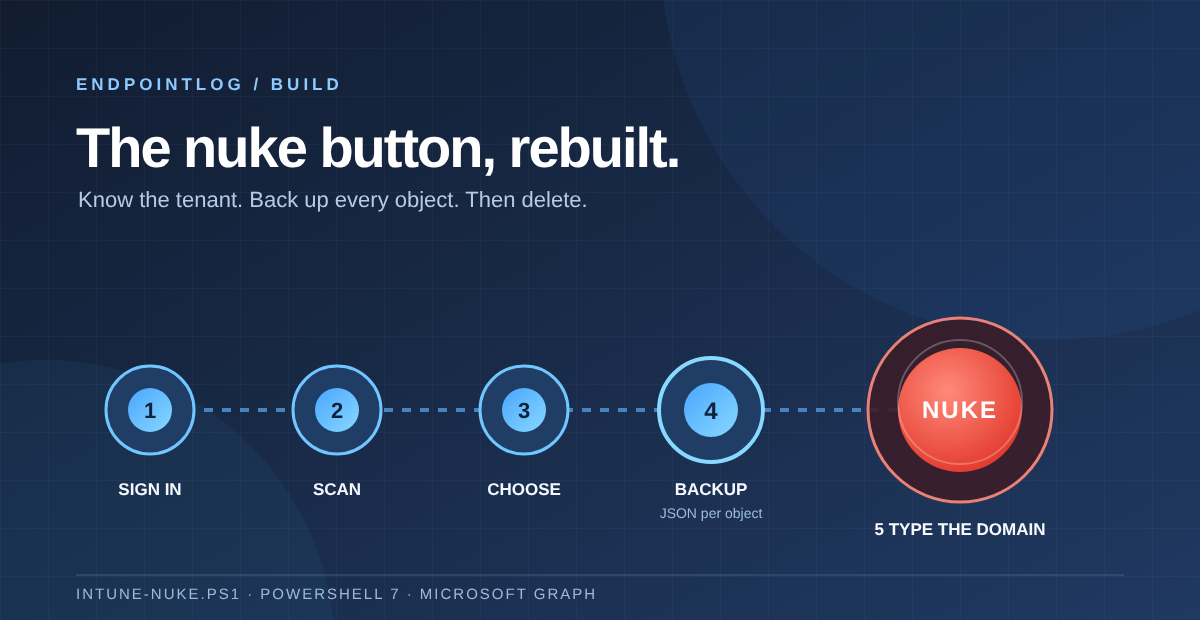
So I rebuilt it. Not a patch with the tenant check pasted in after the connect, but a new script: Intune-Nuke.ps1. It is a five-step wizard that signs you in fresh, shows you exactly where you are, lets you choose what goes, backs up every object as JSON before it touches anything, and only deletes after you have typed the tenant’s domain name back to it.
Read the original post: I Built a Nuke Button for Intune
The ground rule hasn’t changed. This is a lab and demo tenant tool: POC teardown, resetting a training environment, handing a tenant back clean. It is not for production, and most of the work in this version went into making it harder to use it in the wrong place.
What changed, in short
- The tenant check is built in. You see the tenant name, initial domain, tenant ID and account straight after sign-in, and the final step only proceeds if you type the initial domain exactly.
- Every object is backed up as JSON before deletion, including assignments and settings. If an object can’t be backed up, it isn’t deleted.
- You choose what goes. The scan groups everything into categories and you pick the ones you want, instead of all or nothing.
- Deletion follows dependency order and retries objects that are still in use, so a policy set or a filter no longer blocks half the run.
- It handles Graph throttling, runs on PowerShell 7 on macOS, Windows and Linux, and asks for fewer permissions than before.
- The scope grew from 25 to 36 object types, and it now also clears apps. More on that below, because it is the one change that can catch you out.
Step 1: a fresh sign-in, every time
The scenario I worried about last time was the stale session. Connect-MgGraph happily reuses whatever context you had, and if you were in a customer tenant an hour ago, that is where the script would run.
Version two disconnects any existing Graph session first, then signs in interactively with a process-scoped context, so the token doesn’t outlive the PowerShell window. You can pass -TenantId to target a specific tenant. As soon as you’re connected, it reads the organisation from Graph and shows the tenant display name, the initial onmicrosoft.com domain, the tenant ID and the signed-in account, then asks whether that is the right tenant. The default answer is no.
Step 2: scan without changing anything
The scan is read-only. It goes through every object type and counts what is there, grouped into eleven categories: policy sets, app protection and app config, apps, compliance, configuration and endpoint security, scripts and remediations, Windows updates, enrollment, tenant admin, assignment filters and scope tags.
Two details make the output easier to trust. Endpoints that can’t be read, usually because a feature isn’t licensed or enabled in the tenant, are listed separately with the error instead of breaking the scan. And built-in objects that can’t be removed are counted as skipped, so you can see the script deliberately leaving them alone: Microsoft’s global apps and remediation scripts, the default enrollment configurations, the default Company Portal branding profile, built-in Intune roles and the default scope tag.
Step 3: choose what goes
The first version was all or nothing. That is fine for a full teardown, but more often I want to reset compliance and configuration and keep my enrollment setup. Now you choose. If Out-ConsoleGridView is installed you get a checkbox list in the terminal. Otherwise you type category numbers, ranges like 2-6, or A for everything. Nothing selected means nothing happens.
Step 4: a backup before every delete
This is the change I care about most. Before anything is removed, each selected object is exported to its own JSON file, sorted into folders per category and type under IntuneNuke-Backups, in a run folder named after the tenant domain and a timestamp.
The export is fuller than a plain GET. Settings Catalog and endpoint security policies are exported with their settings and assignments. Administrative templates include their definition values and presentation values, legacy security baselines include their settings, and notification templates include their localised messages. Each file also records the object type, its Graph path and the export time.
The rule that matters: if the backup of an object fails, that object goes nowhere. It is logged as a backup failure and left out of the deletion queue.
That also changes what -DryRun means. In the first version a dry run was a scan and a count. Now it is a scan plus a full backup, with no deletion. That makes it a useful export of a lab tenant even when you don’t intend to clear it.
To be clear about the limits: this is a backup, not an undo button. There is no restore script yet. The JSON gives you a record of exactly what was there and the raw material to rebuild it by hand or with your own import tooling.
Step 5: type the tenant domain
The last step shows how many objects will be removed and from which tenant, by display name and initial domain. Then it asks you to type that domain. Not YES, not a keypress, but contoso-lab.onmicrosoft.com, character for character. Get it wrong and it stops with nothing deleted.
After that there is a five-second countdown in red, so Ctrl+C still gets you out. Small, but it is the moment you most often realise something.
Deletion runs in a fixed order to respect dependencies. Policy sets go first because they reference everything else. Filters and scope tags go last because they are in use until the objects that reference them are gone. Autopilot profiles have their assignments removed before the profile itself, and custom Intune roles have their role assignments removed first. Anything that still fails with an in-use error, such as an app with supersedence or a dependency, gets another try in a second and third round, ten seconds apart. Only what still fails after that is reported as an error.
Every backup and delete ends up in nuke-log.csv in the run folder: time, category, type, name, ID, action, result and error, so you can filter it in Excel instead of scrolling a text log.
What it clears now, and the change to watch
The first version covered 25 endpoints. Version two covers 36 object types. New are policy sets, Windows app protection, custom compliance scripts, reusable settings such as firewall rule groups, imported ADMX files, Apple ADE and user-initiated enrollment profiles, Android Enterprise enrollment profiles, device categories, terms and conditions, non-default Company Portal branding and custom Intune roles with their assignments.
The one to watch: apps. Last time I wrote that the script doesn’t remove the apps you’ve uploaded. That is no longer true. Version two includes the mobileApps endpoint and removes every app that isn’t a built-in Microsoft global app. Apps are a separate category in the selection, so if you want to keep your Win32 packages, leave it unticked.
Two things I deliberately took out of scope. The first version deleted depOnboardingSettings, which is the Apple ADE token connection itself, not just the profiles. This version only removes the enrollment profiles under each token and leaves the token in place. More generally, it leaves connectors and tokens alone: APNs, ADE, VPP and Managed Google Play. Renewing an Apple push certificate because you reset a lab is not a good afternoon.
It also no longer deletes default enrollment configurations, and it still doesn’t touch Conditional Access, Entra users and groups, enrolled devices or Autopilot hardware hashes.
If the tenant uses Windows Autopatch, expect some policies to come back. Autopatch recreates its own policies for as long as it is active. The script prints that as a reminder at the end.
Under the hood
A few changes that you won’t notice until they matter:
- Throttling. Every Graph call retries on 429, 503 and 504, with exponential backoff, and respects the Retry-After header when Graph sends one. On a larger tenant the first version could simply hit the limit and log failures.
- Fewer modules and a pinned version. It only loads Microsoft.Graph.Authentication, pinned to 2.25.0, instead of installing the full Graph SDK. Newer releases of the module crashed on my PowerShell 7.4 and 7.5 setup, so the pin is deliberate. If the module is missing, it asks before installing it for the current user.
- Permissions. It requests DeviceManagementConfiguration, Apps, ServiceConfig, RBAC and Scripts ReadWrite, plus Organization.Read.All for the tenant name. DeviceManagementManagedDevices.ReadWrite.All is gone: the script never touches devices, so it doesn’t need the right to.
- Cross-platform. It requires PowerShell 7, and I run it from my Mac with pwsh.
How it ran in my lab
I tested it today against my own lab tenant. First a dry run: 120 objects found and exported, nothing deleted. Then the real run with every category selected: 120 objects backed up and 120 deleted, with zero failures and nothing left for a retry round.
The mix was typical for a lab that has been used for a few months: 89 Settings Catalog and endpoint security policies, 11 compliance policies, 10 template configuration profiles, 5 Autopilot deployment profiles, 2 custom Intune roles, and one each of a custom compliance script, an administrative template and terms and conditions. The whole run, backup included, took under a minute and a half.
How I’d run it
- Use an account that only has rights in the lab tenant, and pass -TenantId so you sign in to the tenant you mean.
- Run with -DryRun first. Check the tenant details, read the scan and open the backup folder.
- Run it for real, select only the categories you want to reset, and leave Apps unticked unless you really want your packages gone.
- Type the domain, watch the countdown, and keep the run folder. The JSON and nuke-log.csv are your record of what left the tenant.
pwsh ./Intune-Nuke.ps1 -DryRun -TenantId contoso-lab.onmicrosoft.com
pwsh ./Intune-Nuke.ps1 -TenantId contoso-lab.onmicrosoft.com
The full script
Here is the complete script. The console prompts and some category names are in Dutch, because that is the language I work in. They are short, and the flow follows the five steps above: answer j for yes at the tenant check. You can also download the file directly. PowerShell 7 and lab tenants only.
<#
.SYNOPSIS
    Intune Nuke - verwijdert (na backup) alle Intune-configuratie uit een tenant.
    Conditional Access, Entra ID-objecten, connectors/tokens en devices blijven ongemoeid.

.DESCRIPTION
    Wizard in 5 stappen:
      1. Inloggen         - interactief, je ziet direct tenantnaam + account
      2. Scannen          - telt per categorie wat er staat (verandert niets)
      3. Kiezen           - vink categorieën aan (of A = alles)
      4. Backup           - elk object wordt eerst als JSON weggeschreven
      5. Nuke             - pas na het intypen van de tenant-domeinnaam

    Werkt op macOS, Windows en Linux (PowerShell 7+).

.PARAMETER DryRun
    Scan + backup, maar verwijder niets. Handig om eerst te zien wat er zou gebeuren.

.PARAMETER TenantId
    Optioneel: tenant-ID of domein om in te loggen (anders je standaardtenant).

.PARAMETER BackupPath
    Map waar backups en logs komen. Standaard: ./IntuneNuke-Backups

.EXAMPLE
    pwsh ./Intune-Nuke.ps1 -DryRun
    pwsh ./Intune-Nuke.ps1
    pwsh ./Intune-Nuke.ps1 -TenantId contoso.onmicrosoft.com
#>
#Requires -Version 7.0
[CmdletBinding()]
param(
    [switch]$DryRun,
    [string]$TenantId,
    [string]$BackupPath = (Join-Path (Get-Location) 'IntuneNuke-Backups')
)

$ErrorActionPreference = 'Stop'
$Graph = 'https://graph.microsoft.com/beta'

# ----------------------------------------------------------------------------
#  Wat wordt er opgeruimd? (volgorde = verwijdervolgorde, i.v.m. afhankelijkheden)
# ----------------------------------------------------------------------------
$Types = @(
    # 1. Policy sets eerst: die verwijzen naar alles hieronder
    @{ Group='Policy sets';                       Name='Policy sets';                         Uri='deviceAppManagement/policySets' }

    # 2. App protection & app configuration (verwijzen naar apps)
    @{ Group='App protection & app config';       Name='App protection - iOS';                Uri='deviceAppManagement/iosManagedAppProtections' }
    @{ Group='App protection & app config';       Name='App protection - Android';            Uri='deviceAppManagement/androidManagedAppProtections' }
    @{ Group='App protection & app config';       Name='App protection - Windows';            Uri='deviceAppManagement/windowsManagedAppProtections' }
    @{ Group='App protection & app config';       Name='WIP (MDM)';                           Uri='deviceAppManagement/mdmWindowsInformationProtectionPolicies' }
    @{ Group='App protection & app config';       Name='WIP (MAM)';                           Uri='deviceAppManagement/windowsInformationProtectionPolicies' }
    @{ Group='App protection & app config';       Name='App config - managed apps';           Uri='deviceAppManagement/targetedManagedAppConfigurations' }
    @{ Group='App protection & app config';       Name='App config - managed devices';        Uri='deviceAppManagement/mobileAppConfigurations' }

    # 3. Apps (ingebouwde 'global' apps van Microsoft kunnen niet weg en worden overgeslagen)
    @{ Group='Apps';                              Name='Apps';                                Uri='deviceAppManagement/mobileApps'
       Skip = { param($o) $o.appAvailability -eq 'global' } }

    # 4. Compliance
    @{ Group='Compliance';                        Name='Compliance policies';                 Uri='deviceManagement/deviceCompliancePolicies' }
    @{ Group='Compliance';                        Name='Custom compliance scripts';           Uri='deviceManagement/deviceComplianceScripts' }

    # 5. Configuratie
    @{ Group='Configuratie & endpoint security';  Name='Configuratieprofielen (templates)';   Uri='deviceManagement/deviceConfigurations' }
    @{ Group='Configuratie & endpoint security';  Name='Settings catalog / endpoint security';Uri='deviceManagement/configurationPolicies'; Expand='settings,assignments' }
    @{ Group='Configuratie & endpoint security';  Name='Administrative templates';            Uri='deviceManagement/groupPolicyConfigurations'
       Children = @('definitionValues?$expand=definition($select=id,displayName,classType),presentationValues') }
    @{ Group='Configuratie & endpoint security';  Name='Security baselines / ES (legacy)';    Uri='deviceManagement/intents'; Children=@('settings') }
    @{ Group='Configuratie & endpoint security';  Name='Reusable settings (firewall e.d.)';   Uri='deviceManagement/reusablePolicySettings'; Expand='' }
    @{ Group='Configuratie & endpoint security';  Name='Geïmporteerde ADMX-bestanden';        Uri='deviceManagement/groupPolicyUploadedDefinitionFiles'; Expand='' }

    # 6. Scripts
    @{ Group='Scripts & remediations';            Name='Platform scripts - Windows';          Uri='deviceManagement/deviceManagementScripts' }
    @{ Group='Scripts & remediations';            Name='Shell scripts - macOS';               Uri='deviceManagement/deviceShellScripts' }
    @{ Group='Scripts & remediations';            Name='Custom attributes - macOS';           Uri='deviceManagement/deviceCustomAttributeShellScripts' }
    @{ Group='Scripts & remediations';            Name='Remediations';                        Uri='deviceManagement/deviceHealthScripts'
       Skip = { param($o) $o.isGlobalScript -eq $true } }

    # 7. Windows updates (update rings zitten bij configuratieprofielen)
    @{ Group='Windows updates';                   Name='Feature updates';                     Uri='deviceManagement/windowsFeatureUpdateProfiles' }
    @{ Group='Windows updates';                   Name='Quality updates (expedite)';          Uri='deviceManagement/windowsQualityUpdateProfiles' }
    @{ Group='Windows updates';                   Name='Driver updates';                      Uri='deviceManagement/windowsDriverUpdateProfiles' }

    # 8. Enrollment
    @{ Group='Enrollment';                        Name='Autopilot deployment profiles';       Uri='deviceManagement/windowsAutopilotDeploymentProfiles'; PreDelete='AutopilotAssignments' }
    @{ Group='Enrollment';                        Name='ESP / restricties / WHfB / limieten'; Uri='deviceManagement/deviceEnrollmentConfigurations'
       Skip = { param($o) $o.priority -eq 0 -or $o.id -match '_Default' } }
    @{ Group='Enrollment';                        Name='Apple ADE enrollment profiles';       Lister='DepProfiles'; Expand='' }
    @{ Group='Enrollment';                        Name='Apple user-initiated profiles';       Uri='deviceManagement/appleUserInitiatedEnrollmentProfiles' }
    @{ Group='Enrollment';                        Name='Android Enterprise enrollment profiles'; Uri='deviceManagement/androidDeviceOwnerEnrollmentProfiles'; Expand='' }
    @{ Group='Enrollment';                        Name='Device categories';                   Uri='deviceManagement/deviceCategories'; Expand='' }
    @{ Group='Enrollment';                        Name='Terms and conditions';                Uri='deviceManagement/termsAndConditions' }

    # 9. Tenant admin
    @{ Group='Tenant admin';                      Name='Notification templates (compliance)'; Uri='deviceManagement/notificationMessageTemplates'; Children=@('localizedNotificationMessages'); Expand='' }
    @{ Group='Tenant admin';                      Name='Company Portal branding (niet-default)'; Uri='deviceManagement/intuneBrandingProfiles'
       Skip = { param($o) $o.isDefaultProfile -eq $true } }
    @{ Group='Tenant admin';                      Name='Custom Intune-rollen (+ toewijzingen)'; Uri='deviceManagement/roleDefinitions'; Expand='roleAssignments'; PreDelete='RoleAssignments'
       Skip = { param($o) $o.isBuiltIn -eq $true } }

    # 10. Filters & scope tags als laatste (anders 'in use')
    @{ Group='Assignment filters';                Name='Assignment filters';                  Uri='deviceManagement/assignmentFilters'; Expand='' }
    @{ Group='Scope tags';                        Name='Scope tags (niet-default)';           Uri='deviceManagement/roleScopeTags'; Expand='assignments'
       Skip = { param($o) $o.isBuiltIn -eq $true -or "$($o.id)" -eq '0' } }
)

$Scopes = @(
    'DeviceManagementConfiguration.ReadWrite.All'
    'DeviceManagementApps.ReadWrite.All'
    'DeviceManagementServiceConfig.ReadWrite.All'
    'DeviceManagementRBAC.ReadWrite.All'
    'DeviceManagementScripts.ReadWrite.All'
    'Organization.Read.All'
)

# ----------------------------------------------------------------------------
#  Helpers
# ----------------------------------------------------------------------------
function Write-Step($n, $text) {
    Write-Host ''
    Write-Host "  [$n/5] $text" -ForegroundColor Cyan
    Write-Host ('  ' + ('─' * 60)) -ForegroundColor DarkGray
}

function Invoke-Graph {
    param([string]$Method = 'GET', [string]$Path)
    $uri = if ($Path -match '^https://') { $Path } else { "$Graph/$Path" }
    for ($i = 0; $i -lt 6; $i++) {
        try {
            return Invoke-MgGraphRequest -Method $Method -Uri $uri -OutputType PSObject -ErrorAction Stop
        } catch {
            $code = $null
            try { $code = [int]$_.Exception.Response.StatusCode } catch {}
            if ($code -in 429, 503, 504 -and $i -lt 5) {
                $wait = [math]::Pow(2, $i + 1)
                try { $ra = $_.Exception.Response.Headers.RetryAfter.Delta.TotalSeconds; if ($ra) { $wait = $ra } } catch {}
                Start-Sleep -Seconds $wait
                continue
            }
            throw
        }
    }
}

function Get-GraphAll([string]$Path) {
    $out  = [System.Collections.Generic.List[object]]::new()
    $next = $Path
    while ($next) {
        $r = Invoke-Graph -Path $next
        if ($null -ne $r.value) { foreach ($v in $r.value) { $out.Add($v) } }
        $next = $r.'@odata.nextLink'
    }
    return $out
}

function Get-ErrText($err) {
    $m = $err.ErrorDetails.Message
    if (-not $m) { $m = $err.Exception.Message }
    try { $j = $m | ConvertFrom-Json; if ($j.error.message) { $m = $j.error.message } } catch {}
    ($m -replace '\s+', ' ').Trim() | Select-Object -First 1
}

function Get-ObjName($o) {
    foreach ($p in 'displayName', 'name', 'fileName') { if ($o.$p) { return [string]$o.$p } }
    return [string]$o.id
}

function Get-SafeName([string]$s) {
    $s = ($s -replace '[\\/:*?"<>|\r\n\t]', '_').Trim()
    if ($s.Length -gt 60) { $s = $s.Substring(0, 60) }
    return $s
}

function Get-Items($t) {
    if ($t.Lister -eq 'DepProfiles') {
        $items = @()
        foreach ($tok in (Get-GraphAll 'deviceManagement/depOnboardingSettings')) {
            foreach ($p in (Get-GraphAll "deviceManagement/depOnboardingSettings/$($tok.id)/enrollmentProfiles")) {
                $p | Add-Member -NotePropertyName '_path' -NotePropertyValue "deviceManagement/depOnboardingSettings/$($tok.id)/enrollmentProfiles/$($p.id)" -Force
                $items += $p
            }
        }
        return $items
    }
    $items = Get-GraphAll $t.Uri
    foreach ($i in $items) { $i | Add-Member -NotePropertyName '_path' -NotePropertyValue "$($t.Uri)/$($i.id)" -Force }
    return $items
}

function Remove-Dependencies($t, $o) {
    switch ($t.PreDelete) {
        'AutopilotAssignments' {
            foreach ($a in (Get-GraphAll "$($o._path)/assignments")) {
                Invoke-Graph -Method DELETE -Path "$($o._path)/assignments/$($a.id)" | Out-Null
            }
        }
        'RoleAssignments' {
            foreach ($a in (Get-GraphAll "$($o._path)/roleAssignments")) {
                Invoke-Graph -Method DELETE -Path "deviceManagement/roleAssignments/$($a.id)" | Out-Null
            }
        }
    }
}

function Backup-Item($t, $o, [string]$dir) {
    $expand = if ($t.ContainsKey('Expand')) { $t.Expand } else { 'assignments' }
    $full = $null
    if ($expand) { try { $full = Invoke-Graph -Path "$($o._path)?`$expand=$expand" } catch {} }
    if (-not $full) { try { $full = Invoke-Graph -Path $o._path } catch { $full = $o } }

    $export = [ordered]@{ _nuke = [ordered]@{ type = $t.Name; graphPath = $o._path; exportedAt = (Get-Date).ToString('s') }; object = $full }
    foreach ($c in @($t.Children)) {
        if (-not $c) { continue }
        try { $export["_child_$(($c -split '\?')[0])"] = Get-GraphAll "$($o._path)/$c" } catch { $export["_child_$c"] = "BACKUP FOUT: $(Get-ErrText $_)" }
    }
    $file = Join-Path $dir ("{0}__{1}.json" -f (Get-SafeName (Get-ObjName $o)), $o.id)
    $export | ConvertTo-Json -Depth 50 | Set-Content -Path $file -Encoding utf8
    return $file
}

# ----------------------------------------------------------------------------
#  Banner
# ----------------------------------------------------------------------------
Clear-Host
Write-Host ''
Write-Host '   ██╗███╗   ██╗████████╗██╗   ██╗███╗   ██╗███████╗    ███╗   ██╗██╗   ██╗██╗  ██╗███████╗' -ForegroundColor Red
Write-Host '   ██║████╗  ██║╚══██╔══╝██║   ██║████╗  ██║██╔════╝    ████╗  ██║██║   ██║██║ ██╔╝██╔════╝' -ForegroundColor Red
Write-Host '   ██║██╔██╗ ██║   ██║   ██║   ██║██╔██╗ ██║█████╗      ██╔██╗ ██║██║   ██║█████╔╝ █████╗  ' -ForegroundColor Red
Write-Host '   ██║██║╚██╗██║   ██║   ██║   ██║██║╚██╗██║██╔══╝      ██║╚██╗██║██║   ██║██╔═██╗ ██╔══╝  ' -ForegroundColor Red
Write-Host '   ██║██║ ╚████║   ██║   ╚██████╔╝██║ ╚████║███████╗    ██║ ╚████║╚██████╔╝██║  ██╗███████╗' -ForegroundColor Red
Write-Host '   ╚═╝╚═╝  ╚═══╝   ╚═╝    ╚═════╝ ╚═╝  ╚═══╝╚══════╝    ╚═╝  ╚═══╝ ╚═════╝ ╚═╝  ╚═╝╚══════╝' -ForegroundColor Red
Write-Host ''
Write-Host '   Verwijdert Intune-configuratie. Blijft staan: Conditional Access, Entra-groepen/-users,' -ForegroundColor Gray
Write-Host '   devices, Autopilot-hashes en connectors/tokens (APNs, ADE, VPP, Managed Google Play).' -ForegroundColor Gray
if ($DryRun) { Write-Host '   *** DRY RUN: er wordt NIETS verwijderd ***' -ForegroundColor Yellow }

# ----------------------------------------------------------------------------
#  1. Inloggen
# ----------------------------------------------------------------------------
Write-Step 1 'Inloggen bij Microsoft Graph'

# Vaste moduleversie: nieuwere versies vereisen .NET 10 en crashen op PowerShell 7.4/7.5
$GraphModVer = '2.25.0'
if (-not (Get-Module -ListAvailable -Name Microsoft.Graph.Authentication | Where-Object { $_.Version -eq $GraphModVer })) {
    $ans = Read-Host "  Module Microsoft.Graph.Authentication $GraphModVer ontbreekt. Nu installeren (CurrentUser)? [J/n]"
    if ($ans -match '^[nN]') { Write-Host '  Gestopt.'; return }
    Install-Module Microsoft.Graph.Authentication -RequiredVersion $GraphModVer -Scope CurrentUser -Force -AllowClobber
}
Import-Module Microsoft.Graph.Authentication -RequiredVersion $GraphModVer

# Altijd vers inloggen, zodat je nooit per ongeluk in een gecachte (andere) tenant zit
try { Disconnect-MgGraph -ErrorAction SilentlyContinue | Out-Null } catch {}
$connectArgs = @{ Scopes = $Scopes; NoWelcome = $true; ContextScope = 'Process' }
if ($TenantId) { $connectArgs.TenantId = $TenantId }
Connect-MgGraph @connectArgs

$ctx  = Get-MgContext
$org  = (Invoke-Graph -Path 'https://graph.microsoft.com/v1.0/organization').value | Select-Object -First 1
$initialDomain = ($org.verifiedDomains | Where-Object { $_.isInitial }).name

Write-Host ''
Write-Host "  Tenant   : $($org.displayName)" -ForegroundColor White
Write-Host "  Domein   : $initialDomain"      -ForegroundColor White
Write-Host "  TenantId : $($ctx.TenantId)"    -ForegroundColor White
Write-Host "  Account  : $($ctx.Account)"     -ForegroundColor White
$ok = Read-Host '  Is dit de juiste tenant? [j/N]'
if ($ok -notmatch '^[jJyY]') { Write-Host '  Gestopt. Er is niets gewijzigd.' -ForegroundColor Yellow; Disconnect-MgGraph | Out-Null; return }

# ----------------------------------------------------------------------------
#  2. Scannen
# ----------------------------------------------------------------------------
Write-Step 2 'Scannen (alleen lezen)'

$Inventory = [ordered]@{}
$n = 0
foreach ($t in $Types) {
    $n++
    Write-Progress -Activity 'Scannen' -Status $t.Name -PercentComplete ($n / $Types.Count * 100)
    $entry = @{ Type = $t; Items = @(); Skipped = 0; Error = $null }
    try {
        $all = @(Get-Items $t)
        if ($t.Skip) {
            $keep = @($all | Where-Object { -not (& $t.Skip $_) })
            $entry.Skipped = $all.Count - $keep.Count
            $all = $keep
        }
        $entry.Items = $all
    } catch {
        $entry.Error = Get-ErrText $_
    }
    $Inventory[$t.Name] = $entry
}
Write-Progress -Activity 'Scannen' -Completed

$groups = $Types.Group | Select-Object -Unique
$menu = @()
$i = 0
foreach ($g in $groups) {
    $i++
    $entries = $Inventory.Values | Where-Object { $_.Type.Group -eq $g }
    $count   = ($entries | ForEach-Object { $_.Items.Count } | Measure-Object -Sum).Sum
    $detail  = ($entries | Where-Object { $_.Items.Count -gt 0 } | ForEach-Object { "$($_.Type.Name): $($_.Items.Count)" }) -join ' | '
    $menu += [pscustomobject]@{ Nr = $i; Categorie = $g; Aantal = [int]$count; Details = $detail }
}

Write-Host ''
$menu | Format-Table Nr, Categorie, Aantal, Details -AutoSize -Wrap | Out-String -Width 200 | Write-Host

$errs = $Inventory.Values | Where-Object { $_.Error }
if ($errs) {
    Write-Host '  Niet uit te lezen (vaak: feature niet gelicenseerd/ingeschakeld — kan geen kwaad):' -ForegroundColor DarkYellow
    $errs | ForEach-Object { Write-Host "   - $($_.Type.Name): $($_.Error)" -ForegroundColor DarkGray }
}
$skips = $Inventory.Values | Where-Object { $_.Skipped -gt 0 }
if ($skips) {
    Write-Host '  Overgeslagen (ingebouwd/default, kan niet weg):' -ForegroundColor DarkGray
    $skips | ForEach-Object { Write-Host "   - $($_.Type.Name): $($_.Skipped)" -ForegroundColor DarkGray }
}

$total = ($menu | Measure-Object Aantal -Sum).Sum
if (-not $total) { Write-Host "`n  Niets gevonden om op te ruimen. Je tenant is al schoon." -ForegroundColor Green; Disconnect-MgGraph | Out-Null; return }

# ----------------------------------------------------------------------------
#  3. Kiezen
# ----------------------------------------------------------------------------
Write-Step 3 'Kies wat er weg moet'

$selected = @()
if (Get-Command Out-ConsoleGridView -ErrorAction SilentlyContinue) {
    Write-Host '  Spatie = aan/uitvinken, Enter = bevestigen, Esc = stoppen' -ForegroundColor Gray
    $selected = @($menu | Where-Object Aantal -gt 0 | Out-ConsoleGridView -Title 'Intune Nuke - kies categorieën' -OutputMode Multiple).Categorie
} else {
    while (-not $selected) {
        $inp = Read-Host '  Nummers (bijv. 1,3,5 of 2-6), A = alles, Q = stoppen'
        if ($inp -match '^[qQ]$') { break }
        if ($inp -match '^[aA]$') { $selected = $menu.Categorie; break }
        $nums = foreach ($part in ($inp -split '[,\s]+' | Where-Object { $_ })) {
            if ($part -match '^(\d+)-(\d+)$') { [int]$matches[1]..[int]$matches[2] } elseif ($part -match '^\d+$') { [int]$part }
        }
        $selected = @($menu | Where-Object { $_.Nr -in $nums }).Categorie
        if (-not $selected) { Write-Host '  Geen geldige keuze, probeer opnieuw.' -ForegroundColor Yellow }
    }
}
if (-not $selected) { Write-Host '  Niets gekozen. Gestopt, er is niets gewijzigd.' -ForegroundColor Yellow; Disconnect-MgGraph | Out-Null; return }

$work = @($Inventory.Values | Where-Object { $_.Type.Group -in $selected -and $_.Items.Count -gt 0 })
$workCount = ($work | ForEach-Object { $_.Items.Count } | Measure-Object -Sum).Sum

Write-Host ''
Write-Host "  Gekozen: $($selected -join ', ')" -ForegroundColor White
Write-Host "  Totaal : $workCount objecten" -ForegroundColor White

# ----------------------------------------------------------------------------
#  4. Backup
# ----------------------------------------------------------------------------
Write-Step 4 'Backup maken (JSON per object)'

$stamp   = Get-Date -Format 'yyyyMMdd-HHmmss'
$runDir  = Join-Path $BackupPath ("{0}_{1}" -f (Get-SafeName $initialDomain), $stamp)
New-Item -ItemType Directory -Path $runDir -Force | Out-Null
$logFile = Join-Path $runDir 'nuke-log.csv'
$log = [System.Collections.Generic.List[object]]::new()
function Add-Log($t, $o, $action, $result, $err) {
    $log.Add([pscustomobject]@{ Time = (Get-Date).ToString('s'); Category = $t.Group; Type = $t.Name; Name = (Get-ObjName $o); Id = $o.id; Action = $action; Result = $result; Error = $err })
}

$queue = [System.Collections.Generic.List[object]]::new()
$n = 0; $bkFail = 0
foreach ($e in $work) {
    $t   = $e.Type
    $dir = Join-Path $runDir (Join-Path (Get-SafeName $t.Group) (Get-SafeName $t.Name))
    New-Item -ItemType Directory -Path $dir -Force | Out-Null
    foreach ($o in $e.Items) {
        $n++
        Write-Progress -Activity 'Backup' -Status "$($t.Name): $(Get-ObjName $o)" -PercentComplete ($n / $workCount * 100)
        try {
            Backup-Item $t $o $dir | Out-Null
            Add-Log $t $o 'Backup' 'OK' ''
            $queue.Add(@{ Type = $t; Obj = $o })
        } catch {
            $bkFail++
            Add-Log $t $o 'Backup' 'FOUT' (Get-ErrText $_)   # zonder backup: NIET verwijderen
        }
    }
}
Write-Progress -Activity 'Backup' -Completed
$log | Export-Csv -Path $logFile -NoTypeInformation -Encoding utf8
Write-Host "  Backup klaar: $($queue.Count) objecten -> $runDir" -ForegroundColor Green
if ($bkFail) { Write-Host "  $bkFail objecten konden niet geback-upt worden en worden NIET verwijderd (zie log)." -ForegroundColor Yellow }

if ($DryRun) {
    Write-Host "`n  DRY RUN klaar. Er is niets verwijderd. Bekijk de backupmap om te zien wat er weg zou gaan." -ForegroundColor Yellow
    Disconnect-MgGraph | Out-Null
    return
}

# ----------------------------------------------------------------------------
#  5. NUKE
# ----------------------------------------------------------------------------
Write-Step 5 'NUKE'
Write-Host ''
Write-Host "  Je staat op het punt $($queue.Count) objecten DEFINITIEF te verwijderen uit:" -ForegroundColor Red
Write-Host "      $($org.displayName)  ($initialDomain)" -ForegroundColor Red
Write-Host ''
$confirm = Read-Host "  Typ '$initialDomain' om te bevestigen"
if ($confirm -ne $initialDomain) { Write-Host '  Komt niet overeen. Gestopt, er is niets verwijderd.' -ForegroundColor Yellow; Disconnect-MgGraph | Out-Null; return }

for ($s = 5; $s -gt 0; $s--) { Write-Host "`r  Start over $s s... (Ctrl+C om af te breken) " -NoNewline -ForegroundColor Red; Start-Sleep 1 }
Write-Host ''

# Meerdere rondes: objecten die 'in use' zijn (bijv. app-afhankelijkheden/supersedence)
# lukken vaak wel nadat andere objecten weg zijn.
$pending = $queue
for ($round = 1; $round -le 3 -and $pending.Count -gt 0; $round++) {
    $failed = [System.Collections.Generic.List[object]]::new()
    $n = 0
    foreach ($q in $pending) {
        $n++
        $t = $q.Type; $o = $q.Obj
        Write-Progress -Activity "Verwijderen (ronde $round)" -Status "$($t.Name): $(Get-ObjName $o)" -PercentComplete ($n / $pending.Count * 100)
        try {
            Remove-Dependencies $t $o
            Invoke-Graph -Method DELETE -Path $o._path | Out-Null
            Add-Log $t $o 'Delete' 'OK' ''
            Write-Host "  ✔ $($t.Name): $(Get-ObjName $o)" -ForegroundColor DarkGreen
        } catch {
            $q.LastError = Get-ErrText $_
            $failed.Add($q)
        }
    }
    Write-Progress -Activity "Verwijderen (ronde $round)" -Completed
    if ($failed.Count -eq $pending.Count) { $pending = $failed; break }   # geen voortgang meer
    $pending = $failed
    if ($pending.Count -gt 0 -and $round -lt 3) { Write-Host "  $($pending.Count) objecten nog in gebruik, nieuwe poging over 10 s..." -ForegroundColor DarkYellow; Start-Sleep 10 }
}
foreach ($q in $pending) {
    Add-Log $q.Type $q.Obj 'Delete' 'FOUT' $q.LastError
    Write-Host "  ✘ $($q.Type.Name): $(Get-ObjName $q.Obj) — $($q.LastError)" -ForegroundColor Red
}
$log | Export-Csv -Path $logFile -NoTypeInformation -Encoding utf8

# ----------------------------------------------------------------------------
#  Samenvatting
# ----------------------------------------------------------------------------
$okCount = ($log | Where-Object { $_.Action -eq 'Delete' -and $_.Result -eq 'OK' }).Count
Write-Host ''
Write-Host '  ════════════════════ KLAAR ════════════════════' -ForegroundColor Cyan
Write-Host "  Verwijderd : $okCount"           -ForegroundColor Green
Write-Host "  Mislukt    : $($pending.Count)"  -ForegroundColor ($(if ($pending.Count) { 'Red' } else { 'Green' }))
Write-Host "  Backup     : $runDir"            -ForegroundColor White
Write-Host "  Log        : $logFile"           -ForegroundColor White
Write-Host ''
Write-Host '  Tip: Windows Autopatch maakt zijn eigen policies opnieuw aan zolang Autopatch actief is.' -ForegroundColor DarkGray
Disconnect-MgGraph | Out-Null
Final thoughts
Last time I wrote that the interesting engineering was never the deletion, but the discovery, the preview, the confirmation and the log. Version two adds the two things I was missing: knowing where you are, and being able to see afterwards exactly what was there.
The next thing on my list is a restore that reads those JSON files back in. Until then, the backup makes the nuke button a lot less frightening to press.
Do you back up your lab tenants before you reset them, or is it still a clean slate and hope for the best?

Jewelry Kenepa
Senior Technical Consultant sharing practical knowledge from the Microsoft workplace.
About Jewelry